Synchronous vs Asynchronous JavaScript

JavaScript runs one line at a time, in order, top to bottom. That's the default. And for most code, that's fine.
But what happens when one of those lines takes two seconds? Everything after it waits. The user stares at a frozen screen. That's the problem async solves.
Synchronous Code: One Thing at a Time
Synchronous means each line runs only after the previous one finishes.
console.log("Step 1: Get order")
console.log("Step 2: Make coffee")
console.log("Step 3: Serve coffee")
Output — always in this exact order:
Step 1: Get order
Step 2: Make coffee
Step 3: Serve coffee
Simple. Predictable. But what if Step 2 takes 5 minutes?
Everything stops.
That's the problem with blocking code.
Blocking Code: When Sync Goes Wrong
"Blocking" means a line of code holds up everything else until it's done.
console.log("App started")

const data = fetchFromDatabase() // takes 3 seconds
console.log("Got data:", data)

console.log("UI ready") // waits 3 seconds before this runs
The execution timeline looks like this:

In a browser, this freezes the entire tab. Clicks don't register. Animations stop. The user thinks the page crashed.
This is why JavaScript needs async behavior.
Asynchronous Code: Don't Wait, Keep Moving
Async means: start this task, move on, and come back when it's done.
console.log("App started")

setTimeout(function() {
  console.log("Got data") // runs after 3 seconds
}, 3000)

console.log("UI ready") // runs immediately — doesn't wait
Output:
App started
UI ready
Got data         ← arrives 3 seconds later
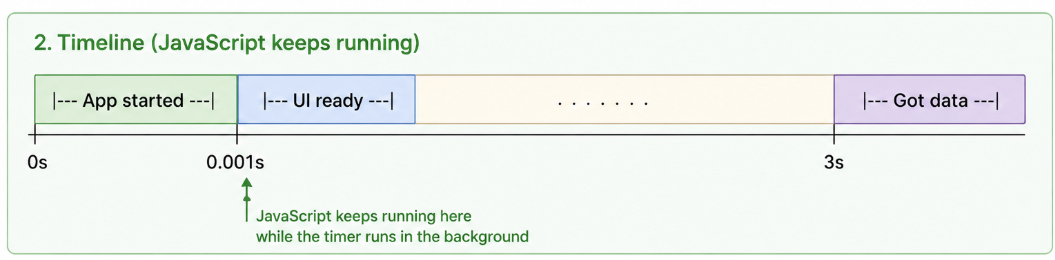
setTimeout doesn't block. JavaScript hands the timer off, moves to the next line, and comes back to run the callback when the time is up.
The execution timeline now looks like this:
The Real-World Example: API Calls
The most common async operation you'll write is fetching data from an API.
If this were synchronous (bad):
// Hypothetical blocking fetch — this is NOT how JS works
const user = fetchUserBlocking("https://api.example.com/user/1")
// Browser freezes here until the server responds
console.log(user.name)
How it actually works (async):
fetch("https://api.example.com/user/1")
  .then(response => response.json())
  .then(user => console.log(user.name))

console.log("This runs while fetch is in-flight")
The fetch goes out over the network. JavaScript doesn't sit there waiting. It moves on. When the server responds, the .then() callback runs with the data.
How JavaScript Handles This: The Event Loop
JavaScript is single-threaded — one call stack, one thing at a time. So how does it handle async without freezing?
The Event Loop.
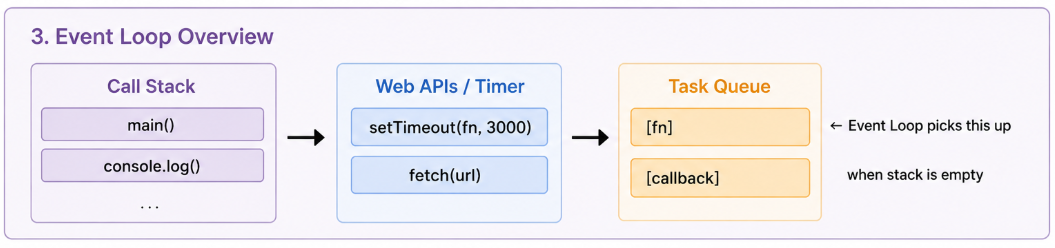
Async tasks (timers, fetch, file reads) are handed off to browser APIs
JavaScript keeps running other code
When async work completes, the callback goes into the Task Queue
The Event Loop checks: is the Call Stack empty? If yes, it pulls the next callback from the queue and runs it
This is why async callbacks never interrupt code that's currently running — they wait for the stack to clear first.
Sync vs Async — Side by Side
// SYNCHRONOUS
function syncExample() {
  console.log("1")
  console.log("2") // always second
  console.log("3")
}

// Output: 1, 2, 3 — every time


// ASYNCHRONOUS
function asyncExample() {
  console.log("1")
  setTimeout(() => console.log("2"), 0) // even 0ms goes async
  console.log("3")
}

// Output: 1, 3, 2 — "2" runs after stack clears
Note the setTimeout with 0ms — it still runs after console.log("3"). Zero delay doesn't mean "run now," it means "run as soon as the stack is empty." This trips up a lot of developers.
Common Async Operations in JavaScript
| Operation | Why it's async |
|---|---|
fetch() / API calls |
Network response time is unpredictable |
setTimeout / setInterval |
Timer runs outside the call stack |
| File reading (Node.js) | Disk I/O is slow |
| Database queries | Query execution takes time |
| User events (click, input) | Happen at unpredictable times |
All of these would block your app if they were synchronous.
The Mental Model
Think of a restaurant kitchen.
Synchronous — one chef who won't start the next dish until the current one is completely done. Guests wait forever.
Asynchronous — one chef who puts a steak in the oven, then moves on to chop vegetables, then plates the salad — coming back to the steak when the timer goes off. Same person, much more done in the same amount of time.
JavaScript is the single chef. Async is how it juggles multiple things without actually doing two things at once.
The One-Line Rule
If a line of code depends on something external — a server, a timer, a file, a user — it should be async. Everything else can be sync.
That distinction, made consistently, is what keeps JavaScript apps fast and responsive.